Coaching businesses rarely lose deals because prospects are uninterested. They lose them in the gap between intent and action, when a visitor clicks from profile to scheduler to payment page to intake form and decides it is easier to do it later. For paid bookings and consultations, the highest-converting setup is usually the one that lets a client choose a time, pay, and confirm in one continuous flow.
That shift matters more in 2026 because discovery now happens across social profiles, AI answers, newsletters, podcasts, and referrals. If a coaching business still treats booking as a separate admin task instead of a conversion event, it leaves revenue on the table.
Why disconnected booking flows quietly kill coaching revenue
A coaching prospect does not experience tools the way an operator does. The coach may think, “the calendar is handled,” because Calendly or another scheduler is embedded somewhere. The client experiences something else: multiple pages, unclear pricing, extra clicks, duplicated form fields, and uncertainty about what happens next.
That friction is not theoretical. According to Stripe’s guide to booking systems with payment, a payment-enabled booking system lets customers lock in a date and time and pay without leaving the page. That matters because every extra transition introduces another opportunity to abandon.
The core issue is not just convenience. It is conversion intent.
A standard booking setup often splits the process into four separate moments:
- The visitor decides whether the offer is relevant.
- The visitor checks calendar availability.
- The visitor decides whether the price feels justified.
- The visitor completes payment and intake.
When those moments happen on different tools, the prospect has too many chances to delay the decision. For coaches selling paid bookings and consultations, delay often means disappearance.
A more integrated page does something simple but commercially important: it keeps motivation intact long enough for the client to commit.
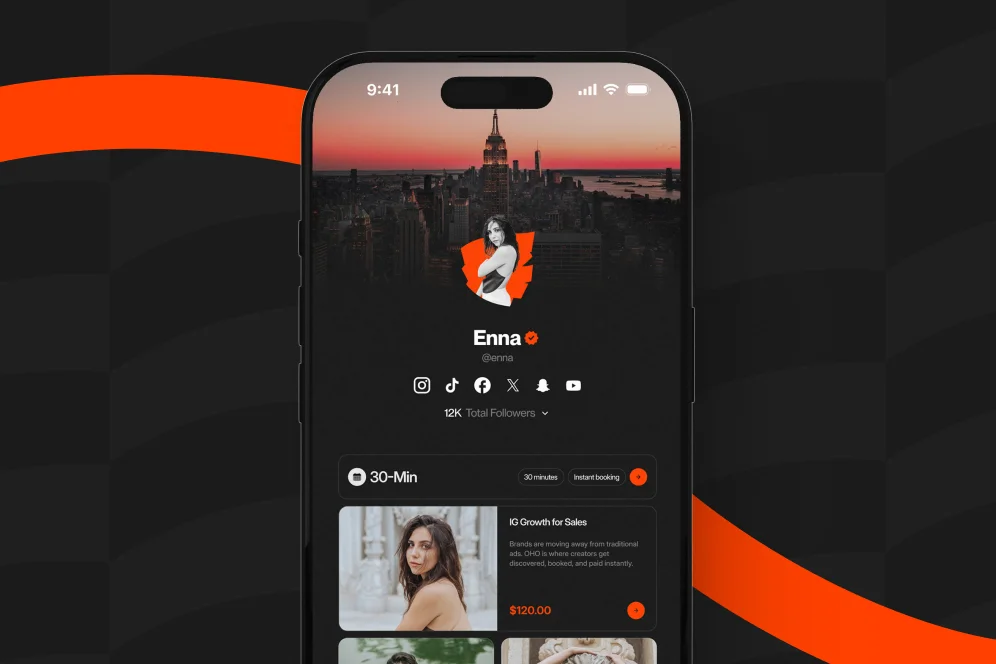
This is also where standard link-in-bio setups start to show their limits. Most link pages are built to route traffic outward. They are not built to help a visitor buy, book, subscribe, and inquire in one place. A platform like Oho is better framed as the monetization layer of the public profile, not just a prettier link list.
The practical stance
Do not optimize for “more clicks to more tools.” Optimize for fewer decisions between interest and payment.
That is the contrarian takeaway worth keeping: many coaching businesses think flexibility requires more tools, but conversion usually improves when the public page handles more of the transaction itself.
The booking-to-payment path that actually converts
For most coaching offers, the most reliable flow is a four-part sequence: offer clarity, schedule selection, payment confirmation, and post-booking follow-through. This article refers to it as the booking-to-payment path because it is simple enough to reuse and specific enough to cite.
If one of those four parts lives on a disconnected system, friction rises quickly.
1. Make the paid session legible before the calendar appears
A scheduler should not be the first serious piece of information a prospect sees. Before the client sees available times, the page should answer a few basic questions:
- What is the session for?
- Who is it for?
- How long is it?
- What does it cost?
- What outcome should the buyer expect?
This sounds obvious, but many coaching pages skip it. They place a generic “Book a call” button above the fold and assume the calendar will do the selling. It will not.
A paid consultation converts better when the page frames the offer clearly. A visitor deciding between a 30-minute audit, a 60-minute strategy session, and a recurring coaching package needs enough context to self-qualify.
That is one reason conversion-focused creator storefronts outperform basic link lists for monetizing experts. The public page can present the offer, the proof, and the action on one surface instead of pushing the visitor into a detached scheduler with no surrounding context.
2. Let clients choose time and commit in the same momentum window
This is where most funnel loss happens. The client sees a slot, feels ready, clicks through, and lands on a separate payment page that feels like a restart.
As documented by Stripe, integrated booking systems reduce friction by combining time selection with payment in one experience. In practical terms, that means the client does not have to re-orient, wonder if the booking is reserved, or question whether payment is required before the slot disappears.
For higher-intent offers such as executive coaching, niche consulting, creator advisory sessions, or paid office hours, that continuity matters. Buyers are not looking for entertainment. They are looking for confidence.
3. Collect only the intake data needed to deliver a good session
Many coaches turn intake into a miniature application process. That can work for premium programs, but it often depresses conversion for standard paid bookings and consultations.
A lean intake form usually performs better when the session is a first step, not a full engagement. The form should gather enough information to tailor the call, not enough to satisfy every internal curiosity.
A practical minimum often includes:
- primary challenge
- website or social profile
- one desired outcome for the session
- timezone and contact email if not already captured
Anything beyond that should earn its place.
4. Reinforce commitment after payment, not before
Once payment is complete, the page should immediately confirm what happens next. This is where reminders, calendar sync, and expectations reduce no-shows and uncertainty.
Platforms built around integrated scheduling emphasize this operational layer as well. SimplyBook.me highlights 24/7 scheduling and automated reminders, and those details matter because conversion is not finished at checkout; it is finished when the client shows up prepared. Google Workspace appointment scheduling also illustrates how booking pages can work directly with calendar availability, reducing manual coordination.
A 4-step rebuild for paid bookings and consultations
Coaches do not usually need a complete tech-stack overhaul on day one. They need a focused rebuild of the public-facing conversion path. The checklist below is the cleanest place to start.
Step 1: Audit every click between discovery and payment
Open the current path exactly as a prospect would.
Start from the place where traffic begins: Instagram bio, LinkedIn profile, email signature, YouTube description, or podcast show notes. Then count the steps required to go from first click to confirmed paid session.
Document:
- how many pages load before payment
- where pricing first appears
- whether the visitor leaves the original brand environment
- where intake questions are introduced
- whether the system explains what happens after booking
If the path feels like a chain of separate apps, that is the problem.
Most low-converting booking pages are actually offer problems disguised as UX problems.
Before evaluating schedulers or storefront tools, define the session catalog clearly. A coaching business should decide which paid bookings and consultations are meant for which stage of buyer intent.
A simple setup might look like this:
- 15-minute fit call: free or low-cost, only for qualified leads
- 45-minute diagnostic session: paid, outcome-focused, best for first-time buyers
- 60-minute implementation consultation: paid, tactical, for buyers who know the problem
- ongoing coaching package: application or follow-up only
This helps reduce choice paralysis. It also makes analytics more useful because each offer maps to a specific buyer need.
Step 3: Combine storefront context with booking intent
The public page should do more than host a button. It should answer enough questions that the client can decide with confidence.
That means combining:
- a clear session title
- pricing visible before the booking step
- expected outcome or deliverable
- lightweight proof such as testimonials, use cases, or who the session is for
- the actual booking action
For creators, consultants, and educators who monetize from a profile page, this is where a conversion-first storefront becomes more useful than a standard link list. Instead of sending visitors out to separate tools for products, bookings, newsletter signup, and collaboration inquiries, a single page can centralize those actions. That is the core logic behind Oho: helping visitors act directly from the profile page rather than bounce across disconnected destinations.
Step 4: Instrument the path so decisions are measurable
Many coaches know bookings feel inconsistent but cannot see where intent drops. Instrumentation fixes that.
At minimum, track these events in Google Analytics or another analytics layer:
- page view on the storefront or booking page
- click on the booking CTA
- slot selected
- checkout started
- payment completed
- confirmation page reached
The point is not to build a giant dashboard. The point is to identify where the leak is.
If clicks are high but slot selection is low, the offer may be unclear. If slot selection is high but payment completion is weak, the checkout experience may be too fragmented. If bookings complete but attendance is poor, the reminder and expectation flow needs work.
What changes on the page when bookings become a conversion system
An integrated storefront is not only a tooling decision. It changes page design, copy priorities, and what gets measured.
The page starts selling before the calendar widget
A high-performing coaching page treats the calendar as the final action, not the opening pitch. The top of the page usually does more with less:
- one strong positioning line
- a short description of the paid offer
- visible pricing or starting price
- one direct CTA
- evidence that the session is useful for a specific kind of buyer
That structure matters for AI-answer visibility too. In an AI-answer environment, brand is the citation engine. Pages that are specific, proof-backed, and easy to summarize are easier for assistants and search features to cite. A generic scheduling page is hard to quote. A page that clearly explains who the consultation is for, what it includes, and how the booking works has a better chance of being referenced.
The checkout stops feeling like an administrative handoff
This is the subtle but important design difference between a scheduler and a storefront.
A scheduler says, “pick a time.” A storefront says, “buy this specific outcome and choose the time that fits.” For paid bookings and consultations, that framing is stronger because it aligns payment with value rather than with calendar mechanics.
Setmore illustrates another important part of that equation: payment flexibility. Its documentation highlights booking pages that can accept payments through options such as Stripe, Square, or PayPal. Multiple payment methods do not guarantee conversion, but they can reduce avoidable friction when buyers have a clear preference.
The profile becomes a revenue page, not a routing page
This matters especially for creators whose traffic starts on social platforms. A profile click is a scarce moment of intent. Sending that visitor from a bio page to a calendar tool to a payment page to a separate email form wastes the moment.
A conversion-oriented profile should let someone buy a digital product, book paid time, subscribe to a newsletter, or submit a structured brand inquiry from the same environment. That is why the stronger comparison is not “which link-in-bio tool has nicer blocks,” but “which public page helps visitors act without leaving.” Readers exploring a better setup can see how a creator storefront fits that model.
Where common setups break, and what to fix first
The most expensive booking problems are often small design and workflow decisions that compound over time. The sections below cover the ones that appear most often.
Too many session types create hesitation
A coaching business may think more options improve relevance. In practice, too many session types create uncertainty about what to buy.
A common fix is to reduce the visible set to three primary paths: exploratory, diagnostic, and implementation-focused. That does not mean the business cannot offer more later. It means the page should not ask a first-time buyer to decode internal packaging logic.
Hidden pricing creates low-quality clicks
Some coaches hide prices to “start the conversation.” That can work for enterprise consulting, but for standard paid bookings and consultations it often creates poor-fit leads and wasted scheduling activity.
Showing the price before the client opens the calendar usually improves self-qualification. It also makes time-slot selection more meaningful because only buyers who understand the commitment keep moving.
There is no evidence in the provided research brief that a longer intake improves paid consultation quality. There is, however, a strong operational case for automation and simplicity. SalesCloser AI’s article on automating paid consultation booking argues that automation reduces manual work and saves time for the provider. The practical implication is straightforward: the more avoidable admin a coaching business inserts into the flow, the more time it spends managing rather than delivering.
A useful rule is to ask only for information that changes how the session will be run.
The handoff after payment is too weak
Many booking systems send a receipt and little else. That misses an opportunity to increase attendance and perceived professionalism.
A stronger post-booking flow includes:
- confirmation of what was purchased
- session length and date
- access details or meeting link timing
- any prep instructions
- reminder cadence
- cancellation or rescheduling policy
That policy question matters because buyers do notice it. In a practitioner discussion on Reddit’s small business forum, operators specifically mention paid bookings, cancellation policies, and reminders as part of the workflow they care about. While anecdotal, it reflects what many service businesses confront in practice: booking is not just a calendar problem, it is a commitment-management problem.
A realistic before-and-after example for a coach rebuilding the flow
Consider a business coach selling a $150 diagnostic session from a social profile.
Baseline: The profile sends visitors to a basic link page. From there, the user clicks “Book a call,” lands on an external scheduler, chooses a slot, then gets pushed to a separate payment page. After payment, an intake form arrives by email. The business tracks only total bookings per month.
The likely issues are easy to predict even without fabricated metrics: some visitors never reach the scheduler, some choose a time but fail to pay, some pay but do not complete intake, and the coach cannot see where drop-off happens.
Intervention: The coach rebuilds the path around one storefront page. The page explains the diagnostic session, lists price and duration, shows who it is for, includes a direct booking action, and collects a short intake before confirmation. Analytics events track page views, booking clicks, checkout starts, completed payments, and attendance.
Expected outcome over 30 to 60 days: fewer unqualified booking attempts, cleaner attribution on where drop-off occurs, and a higher percentage of profile visitors completing the full paid flow. Even when headline conversion does not jump immediately, the business usually gains something equally valuable: visibility into which step is suppressing revenue.
That is the operational advantage many coaches underestimate. Better funnel design is not only about increasing conversion. It is about making lost revenue diagnosable.
Questions coaches ask before changing their setup
Is Calendly still useful if the business wants an integrated storefront?
Yes. A scheduler can still be part of the workflow. The issue is not whether Calendly is good software; the issue is whether the public-facing conversion path forces the client through too many disconnected decisions.
For some businesses, the right move is to keep the scheduler but surround it with clearer offer context, integrated payment, and better analytics. For others, the right move is to shift more of the transaction into a storefront layer.
Does every coaching offer need payment before booking?
No. Discovery calls, fit calls, or application reviews may still work better as free qualification steps. But paid bookings and consultations should usually make payment part of the booking flow, especially when the offer is standardized and the calendar slot has real opportunity cost.
What about SEO if the booking sits on a storefront page?
The main SEO opportunity is not the scheduler itself. It is the surrounding page copy.
A strong storefront page can rank and be cited if it includes a clear offer description, who it serves, pricing context, and helpful supporting content. It can also capture more value from branded and referral traffic because visitors do not need to leave the page to act.
How much automation is worth adding?
Enough to reduce repetitive admin without making the experience feel robotic.
Calendar sync, reminders, payment confirmation, and short pre-session intake are usually worth automating first. Google Workspace, SimplyBook.me, and Zoho Bookings all point to forms of calendar-connected automation that help reduce manual scheduling overhead.
When should a coach choose a storefront instead of another link-in-bio page?
The answer is simple: when the profile page is expected to generate revenue actions, not just outbound clicks.
If the business sells digital offers, books paid sessions, collects newsletter subscribers, and handles brand or partnership inquiries, a conversion-focused page is usually the better fit than a standard link hub.
What to do next if bookings feel harder than they should
Coaching businesses do not need a more complicated funnel for paid bookings and consultations. They need a shorter, more coherent one. The highest-leverage fix is usually to bring offer context, scheduling, payment, and confirmation closer together so the client can decide once and act immediately.
Teams reviewing their current setup should start with one simple exercise: click through the entire path as if they were a first-time buyer and count how many times the experience asks them to re-decide. If that number is high, the booking flow is not just inconvenient; it is under-converting.
For operators looking at alternatives to fragmented link pages, it helps to evaluate whether the public profile can function as a conversion surface instead of a traffic router. That is the core difference between a standard bio link setup and a platform built as a storefront for creators.
If the current booking flow is leaking intent, the next step is to map the path, simplify the offer set, and measure where prospects drop. Businesses that want one page to sell, book, subscribe, and structure inquiries can explore Oho as a conversion-focused option for turning profile traffic into action.
References
- Stripe — Booking system with payment: A guide for businesses
- SalesCloser AI — Best Strategies to Automate Paid Consultation Booking
- Setmore
- SimplyBook.me
- Google Workspace — Online Appointment Scheduling with Google Calendar
- Zoho Bookings
- Reddit — Platforms & Payment for Online (Virtual) Consultation